

Two important settings of smartphone
Many incidents of cyber fraud have come to light last year. Many people’s bank accounts have become empty due to online fraud. According to cyber crime portal, about 6 thousand people become victims of cyber fraud every day in India. Many types of campaigns are also being run by the government regarding this. Many times, people who are victims of cyber fraud do not even have a clue and get trapped in the trap of criminals. Most people become victims of ghost hacking through smartphones. If you do not want to become a victim of online fraud in 2026, then immediately turn on these two settings in your smartphone.
It is easy for cyber criminals to target Android users. They send app links to users through messages, WhatsApp or other means, as soon as users click on these links, malware gets installed on their phones. These malware steal personal information from the user’s smartphone and even give hackers access to the device. In such a situation, users should turn on two settings in their phones so that hackers are not able to install any app in their phones. This method will prevent hackers from giving access to the phone and will protect you from online fraud.
Turn on these two settings
First of all, Android users have to stop installing third party apps in their phones. For this the user will have to go to the settings of his phone. After this you have to search ‘Install Unknown Apps’ in the search option. By tapping on ‘Install Unknown Apps’ from the option that comes after searching, the apps found in the list will have to turn off the permission to install unknown apps. Although by default it is set as Not Allowed in the phone, but for some reason if it remains on in the phone, then hackers can install unknown malware apps in the phone as per their wish.
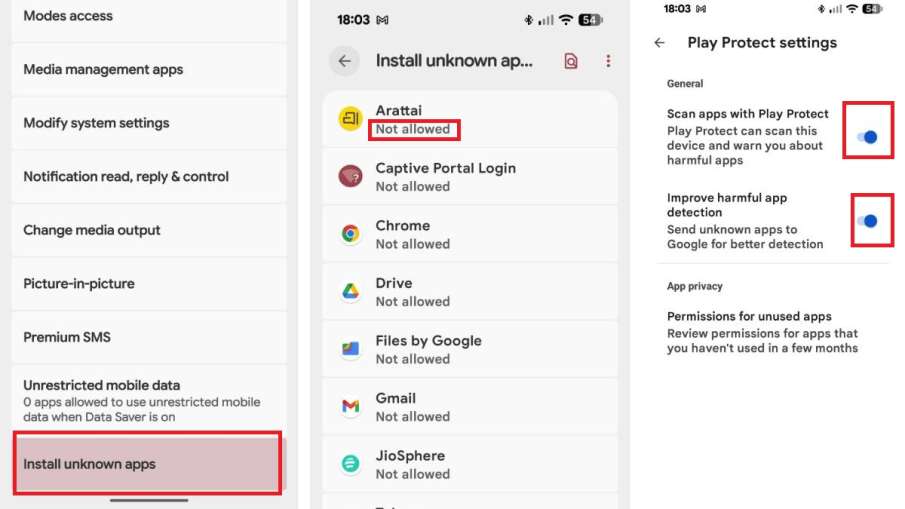
android smartphone settings
After this, once again go to the phone’s settings and search ‘Google Play Protect’ and enable it. This setting will tell whether the app is genuine or not while installing an app from Google Play Store in the phone. With this, only those apps will be installed in the phone, which are listed on Google Play. Additionally, it will also scan the apps installed on your phone to see if there is any malware in it. In this way you can protect your phone from the control of hackers.
Also read –
Samsung is bringing a phone with 20000mAh battery, Chinese companies are shocked, big revelation in the new leak
BSNL’s plan runs from January to December, the number will remain active throughout the year at low cost.